Getting started

Set up Codex

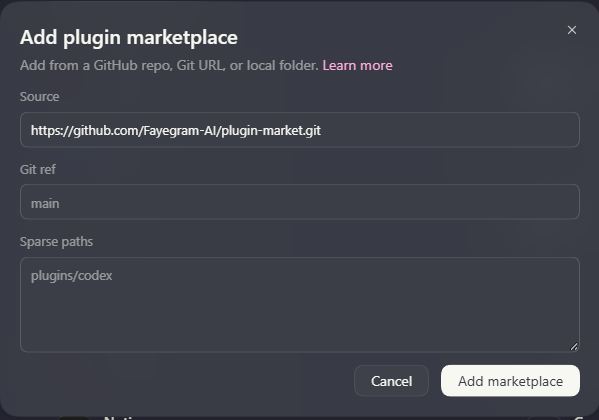
Add the marketplace to make its plugins available. Install the ones you want, whenever you need them.

Compatibility and verification

Compatibility and verification

Documented procedure

Git syntax is documented and confirmed by CLI help. A complete Git installation has not been newly verified for this guide.

Recorded
2026-09-30
Supporting documentation
Requirements
  • Install Codex and sign in before running skills. Use the official documentation if the application is not yet available.
  • Check the chosen plugin's requirements; some skills need additional tools or runtimes.
  • Use PowerShell on Windows or Bash/zsh on macOS/Linux. Interactive slash commands are entered inside the application.
  • Git and access to the configured repository are required. Registration can run from any directory; it fetches the source for you.

Add Faye Plugin Market

Run this once for the selected source. If the same source is already registered, reuse it. Adding a marketplace makes its plugins available to choose; it does not install them all.

Add marketplace · PowerShell
codex plugin marketplace add https://github.com/Fayegram-AI/plugin-market.git
Add marketplace · Bash / zsh
codex plugin marketplace add https://github.com/Fayegram-AI/plugin-market.git

What you should seeThe source is registered. Its native marketplace identity is faye-plugin-market.

Available plugins

Once the marketplace is added, you can stop here or install any of these plugins. Adding the marketplace does not install every plugin.

Faye Coding Assistantv0.1.0-beta.7Focused, scope-preserving coding skills.

Install Faye Coding Assistant only if you want its skills. Review any permission or trust prompts shown by the application.

Install Faye Coding Assistant · PowerShell
codex plugin add faye-coding-assistant@faye-plugin-market
Install Faye Coding Assistant · Bash / zsh
codex plugin add faye-coding-assistant@faye-plugin-market

What you should seeFaye Coding Assistant appears in the installed plugin list. Compare its version with 0.1.0-beta.7 shown by this marketplace.

Faye Image Utilityv0.1.0-beta.6Image auditing, editing, conversion, and rating estimates.

Install Faye Image Utility only if you want its skills. Review any permission or trust prompts shown by the application.

Install Faye Image Utility · PowerShell
codex plugin add faye-image-utility@faye-plugin-market
Install Faye Image Utility · Bash / zsh
codex plugin add faye-image-utility@faye-plugin-market

What you should seeFaye Image Utility appears in the installed plugin list. Compare its version with 0.1.0-beta.6 shown by this marketplace.

Faye UI System Engineerv0.1.0-beta.4Web UI design, implementation, review, and inspection.

Install Faye UI System Engineer only if you want its skills. Review any permission or trust prompts shown by the application.

Install Faye UI System Engineer · PowerShell
codex plugin add faye-ui-system-engineer@faye-plugin-market
Install Faye UI System Engineer · Bash / zsh
codex plugin add faye-ui-system-engineer@faye-plugin-market

What you should seeFaye UI System Engineer appears in the installed plugin list. Compare its version with 0.1.0-beta.4 shown by this marketplace.

Confirm installation and start a new session

Check the plugins you selected are installed and enabled where the application exposes that state. The list command below is a quick confirmation, not a test of every skill.

Start a new Codex session, open its skill picker or Plugins interface, and choose a task from the installed plugin's skill guides. Read that skill's inputs and requirements before sending your request.

Codex skill requests may use $skill-name. Copy the example from the selected skill's guide, including any explicit invocation it requires.

List installed plugins · PowerShell
codex plugin list --marketplace faye-plugin-market
List installed plugins · Bash / zsh
codex plugin list --marketplace faye-plugin-market

What you should seeYour selected plugins are installed and their applicable skills can be found or explicitly invoked in a fresh session.

Other ways to install

Check an existing installation

Use this before adding a second source or when setup reports that the plugin already exists. Compare the names and source locations; reuse a matching installation.

Installed plugins · PowerShell
codex plugin list --marketplace faye-plugin-market
Installed plugins · Bash / zsh
codex plugin list --marketplace faye-plugin-market
Registered marketplaces · PowerShell
codex plugin marketplace list
Registered marketplaces · Bash / zsh
codex plugin marketplace list

What you should seeThe intended source and installed package are identified without removing other registrations.

Manage later

Refresh the Git marketplace

Refresh the source when you want to check for new package versions. Compare installed versions afterward; refreshing the catalog alone is not evidence that each installed plugin was updated.

Refresh marketplace · PowerShell
codex plugin marketplace upgrade faye-plugin-market
Refresh marketplace · Bash / zsh
codex plugin marketplace upgrade faye-plugin-market

What you should seeThe marketplace refresh succeeds; inspect the desired plugin's current and available version before changing its installation.

Enable or disable a plugin

Open /plugins inside Codex. Select an installed plugin and use the displayed enable/disable action. Disabling keeps the installation but makes its capabilities unavailable until enabled again.

Inside Codex
/plugins

What you should seeThe plugin browser shows the intended enabled state.

Uninstall Faye Coding Assistant

Only use this when you intend to remove this plugin. It removes the selected installation and its capabilities; it is not a troubleshooting prerequisite. Leave other plugins and marketplace sources intact.

Uninstall selected plugin · PowerShell
codex plugin remove faye-coding-assistant@faye-plugin-market
Uninstall selected plugin · Bash / zsh
codex plugin remove faye-coding-assistant@faye-plugin-market

What you should seeFaye Coding Assistant is no longer listed as installed.

Uninstall Faye Image Utility

Only use this when you intend to remove this plugin. It removes the selected installation and its capabilities; it is not a troubleshooting prerequisite. Leave other plugins and marketplace sources intact.

Uninstall selected plugin · PowerShell
codex plugin remove faye-image-utility@faye-plugin-market
Uninstall selected plugin · Bash / zsh
codex plugin remove faye-image-utility@faye-plugin-market

What you should seeFaye Image Utility is no longer listed as installed.

Uninstall Faye UI System Engineer

Only use this when you intend to remove this plugin. It removes the selected installation and its capabilities; it is not a troubleshooting prerequisite. Leave other plugins and marketplace sources intact.

Uninstall selected plugin · PowerShell
codex plugin remove faye-ui-system-engineer@faye-plugin-market
Uninstall selected plugin · Bash / zsh
codex plugin remove faye-ui-system-engineer@faye-plugin-market

What you should seeFaye UI System Engineer is no longer listed as installed.

Open original image