Compatibility and verification
Compatibility and verification
Verification pending
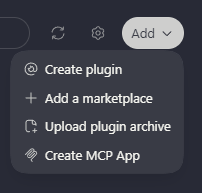
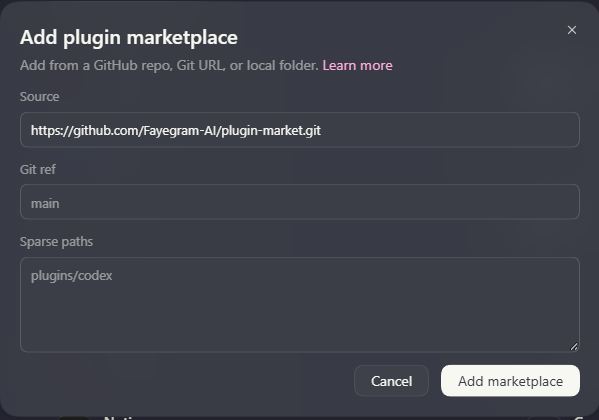
The supplied screenshots show the Add a marketplace menu and its source fields. A complete installation check in this interface is still awaiting confirmation; the screenshots do not establish that a plugin was installed or activated.
- Recorded
- 2026-09-30
Add the marketplace in Codex
Open Plugins, then choose Add → Add a marketplace. The Source field accepts a GitHub repository, Git URL, or local folder.
Leave Git ref and Sparse paths empty to use the repository defaults and the complete marketplace. The grey examples in those fields are placeholders, not values you need to enter.
For this target, enter https://github.com/Fayegram-AI/plugin-market.git in Source.
Select Add marketplace. Once the source is available in Plugins, browse its entries and install the plugins you want. If the source cannot be added, use the official documentation linked below.
Requirements
- Install Codex and sign in before running skills. Use the official documentation if the application is not yet available.
- Check the chosen plugin's requirements; some skills need additional tools or runtimes.